
API keys authenticate every request to the Render API. Keys are created in the Maildeno dashboard and can be scoped to specific render targets.
Creating a key
-
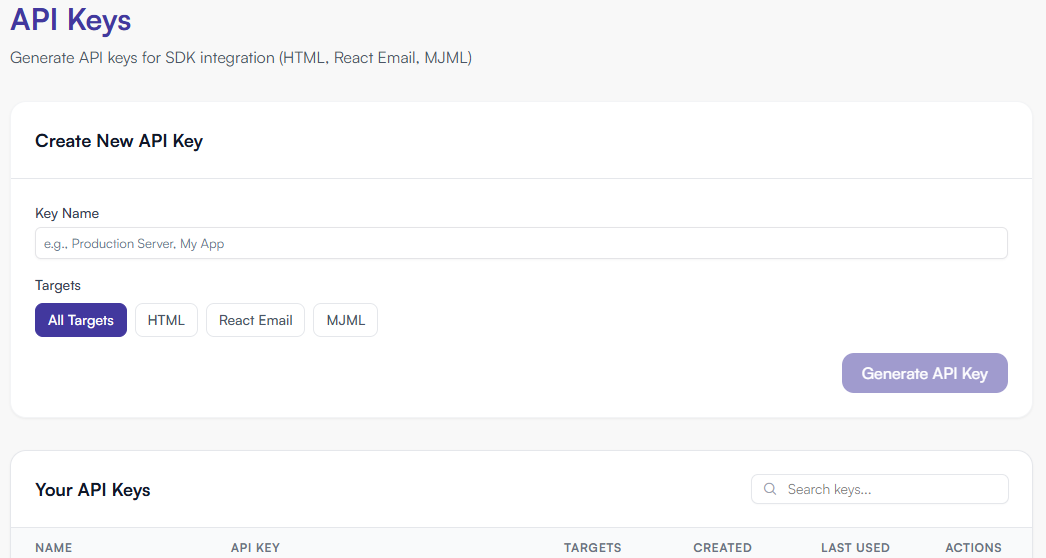
Go to Dashboard → API Keys → Create Key.
-
Enter a descriptive name (e.g.
production-html,staging-all). -
Select the Targets this key is allowed to render.
-
Click Create.
-
Copy the key — it is shown only once.
| Store keys in a secrets manager or environment variables. Never commit them to source control or expose them in client-side code. |
Target scopes
| Targets value | Allowed render calls |
|---|---|
|
|
|
|
|
|
Revoking a key
-
Go to Dashboard → API Keys.
-
Click Trash icon to → Revoke key.
-
Confirm. Requests using the revoked key will immediately receive
401 INVALID_API_KEY.
Key naming conventions (recommended)
Use a consistent naming scheme to make key management easier at scale:
{environment}-{service}-{target}

Examples:
  production-backend-html
  staging-newsletter-service-all
  ci-test-runner-html
Creating keys via the REST API
curl -X POST https://api.maildeno.com/v1/keys \
  -H "Content-Type: application/json" \
  -H "Authorization: Bearer <ADMIN_KEY>" \
  -d '{"name": "HTML only", "targets": ["html"]}'
See SDK: API Key Scopes for the full reference.